Harbingers Of Death
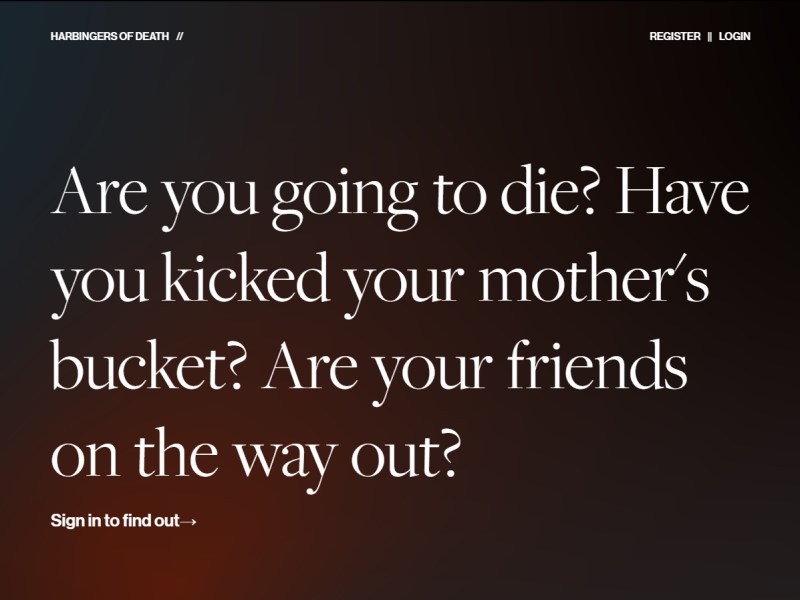
'Are you going to die?' compiles historic superstitions about death. This project satirizes present-day conspiracy theories, by presenting now-defunct superstitions as if they are real.
Type
LAMP Website
Year
2018
Skills Applied
- Back-End
- Front-End
- Java
Team
- Personal Project
The Task
The intent of this project was to practice back-end development, using the LAMP stack. Users can sign up to the site, interact with items on the site and are greeted by a customized homepage. The site features database driven content, secure authentication handling, and AJAX searching and filtering.
The Result
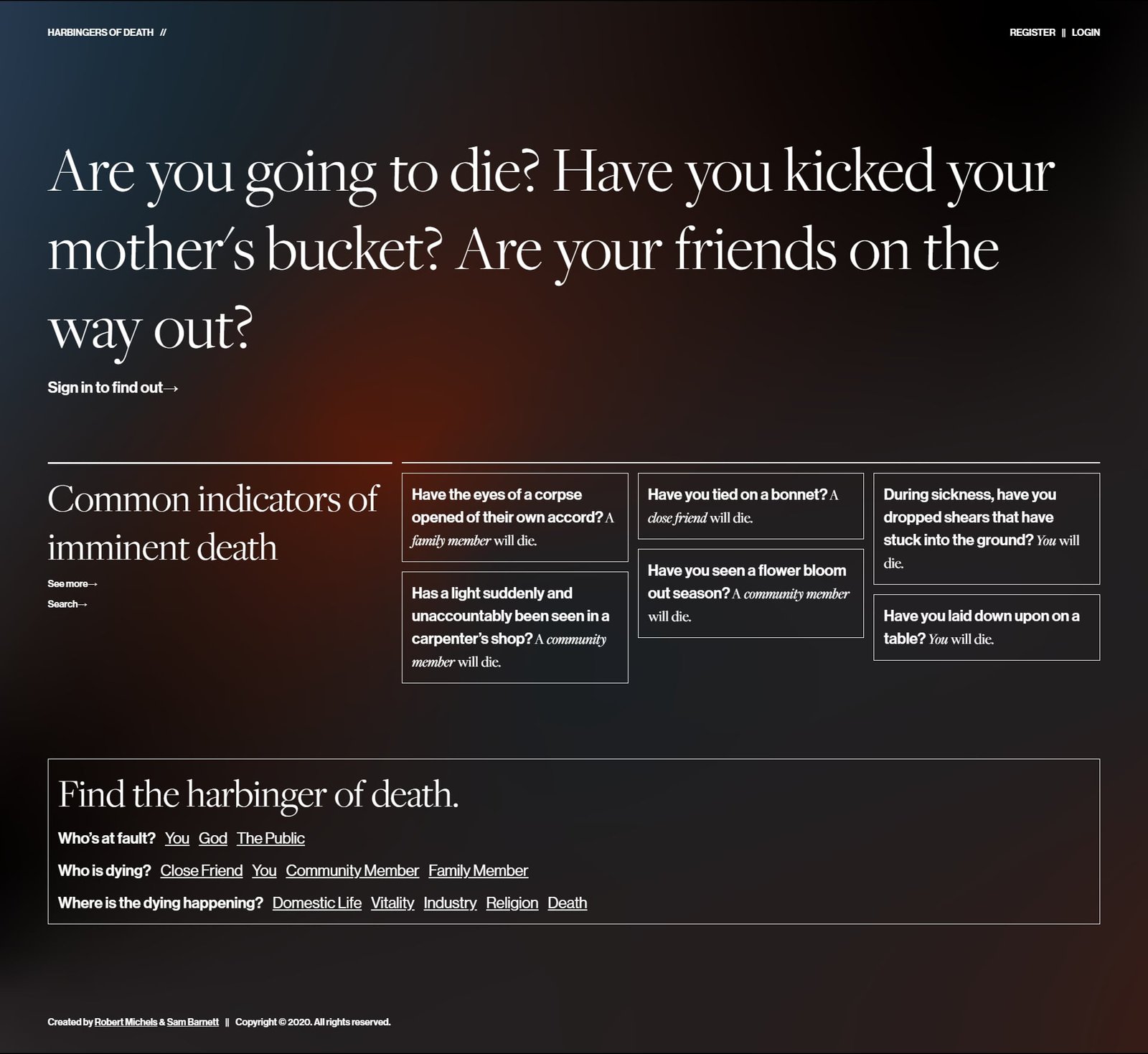
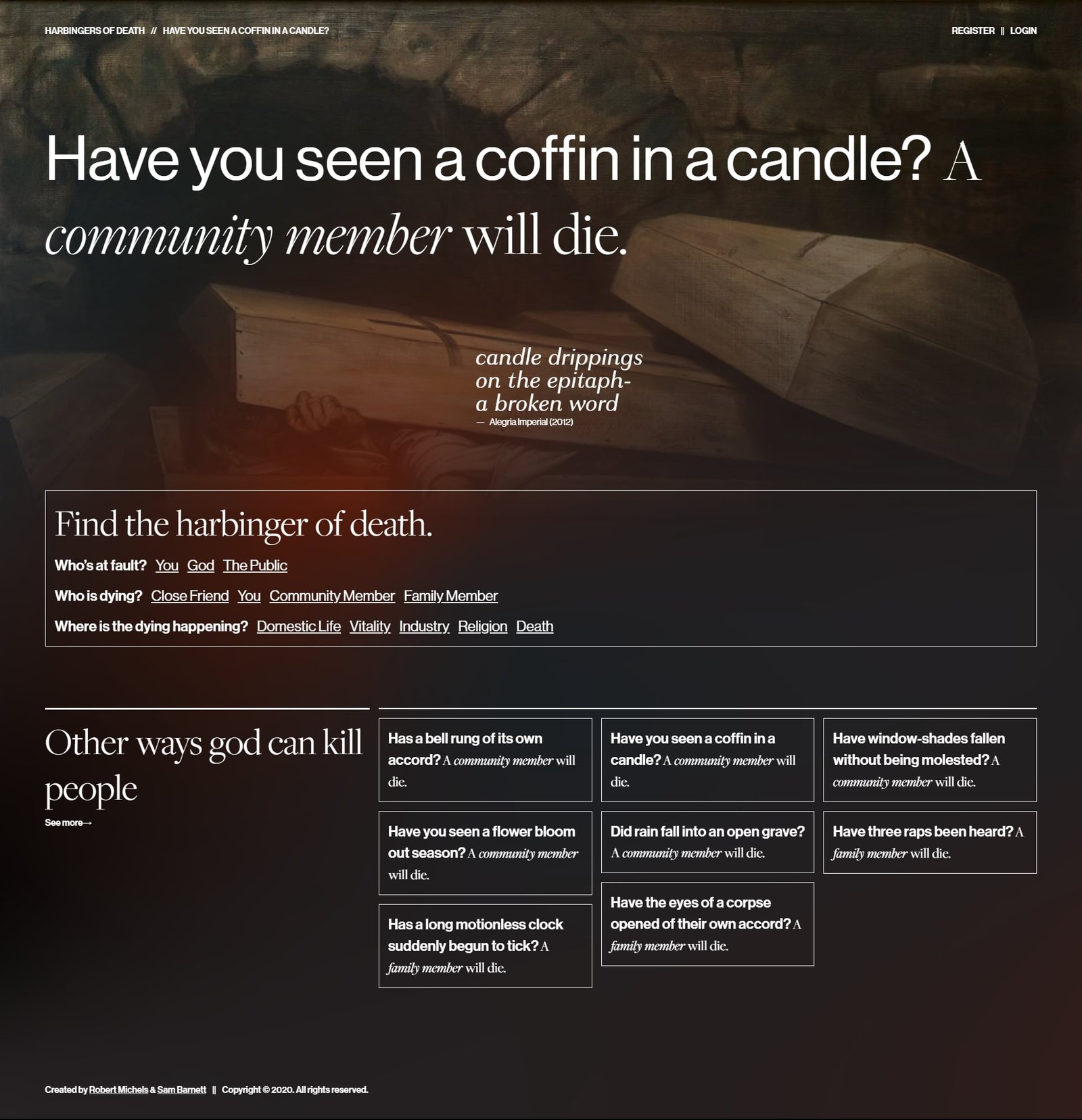
Harbingers of Death presents now-defunct omens sourced from an 1889 article as if they are real, as a satire of modern conspiracy theories. The Content Units are individual omens. They contain information about who is affected, what triggers the omen, and the kind of scenario you would encounter them in. Users can explore them through different taxonomies and by search.
Visitors can filter the omens by who is at fault, who will die, and the aspect of life that they apply to. Visitors may also search omens using a text input.
Website members sign in to keep track of which omens they have experienced, and whom it indicates is going to die.

The Code
A crucial element for the success of this project was the separation of views and logic. This allowed us to write very clean code. For instance, when I implemented the individual omen's content pages, I seperated code responsible for displaying the page from the code that deals with retrieving and organizing data. At runtime, when the omen route is processed in index.php, the code constructs an Omen instance using OmenCollection.php, and passes this instance to the page view omen.php.
<?php// CODE SNIPPET, NOT THE FULL FILE ///************************************************* ** INDIVIDUAL OMEN ROUTE *************************************************/// Add the individual omen routeRoute::get('/omen/([a-z0-9]+(?:-[a-z0-9]+)*)', function($slug) { $omen = OmenCollection::getOmenBySlug($slug); Page::build('omen', ["omen" => $omen]);});?><?php// CODE SNIPPET, NOT THE FULL FILE ///** * @return Omen */public static function getOmenBySlug(string $slug) : Omen{ //Select all from the table that is created by performing inner joins. Tables joined: omen, aspect, death & fault. $query = "SELECT * FROM"; //Join omen with aspect $query .= " (((".self::T_OMEN." INNER JOIN ".self::T_ASPECT." ON ".self::T_OMEN.".".self::C_ASPECT." = ".self::T_ASPECT.".".self::C_TERM.")"; //Join result with death $query .= " INNER JOIN ".self::T_DEATH." ON ".self::T_OMEN.".".self::C_DEATH." = ".self::T_DEATH.".".self::C_TERM.")"; //Join result with fault $query .= " INNER JOIN ".self::T_FAULT." ON ".self::T_OMEN.".".self::C_FAULT." = ".self::T_FAULT.".".self::C_TERM.")"; //Filter result by omen slug $query .= " WHERE ".self::T_OMEN.".".self::C_SLUG." = '".$slug."';"; return (new self)->processQuery($query)->getOmens()[0];}?><?phpuse Taxonomy\Taxonomy\AspectTaxonomy;use Taxonomy\Death\DeathTaxonomy;use Taxonomy\Fault\FaultTaxonomy;use Entity\Omen;use Entity\Omen\OmenCollection;use View\Partial;// TODO: 404 error handling//Provide similar omens (same fault)$filter = array("fault" => $omen->getFault()->getSlug());$omensCollection = OmenCollection::findOmensByFilter($filter);// if the user is logged inif (isset($_SESSION['user'])){ //Get user omens so that we can set the title to statement on only those omens $user = $_SESSION['user']; // update the omen's that the user has selected $omensCollection->setStatements($user->getUserOmens());}?><?= Partial::build('layout/header'); ?><!--THE REGISTRATION MODAL WINDOW--><?= Partial::build('modal/register'); ?><!--THE LOGIN MODAL WINDOW--><?= Partial::build('modal/login'); ?><!--THE ACCOUNT MODAL WINDOW--><?= Partial::build('modal/account'); ?><!--THE HOMEPAGE WINDOW--><?= Partial::build('nav', ["breadcrumb" => $omen->getTitle()]) ?><img src="<?php echo $omen->getImage() ?>" class="omenImg" alt="<?php echo $omen->getImageAuthor() ?>" title="<?php echo $omen->getImageAuthor() ?>"><?= Partial::build("omenHero", ["omen" => $omen ]); ?><article itemscope itemtype="http://schema.org/CreativeWork" class="poem g-margin4of9 g-span4of9"> <p class="poem__body"> <?= str_replace('/',"<br>", $omen->getPoem()); ?> </p> <footer class="poem__author"> —<cite itemprop="author"><?php echo $omen->getPoemAuthor() ?></cite> </footer></article><?= Partial::build('taxonomyTile'); ?> <section> <div class="layout layout--distant g-flex"> <div class="tile__panel tile__panel--primary g-span3of9"> <h2>Other ways <?php echo strtolower($omen->getFault()->getTitle()) ?> can kill people</h2> <span class="callToAction"><a href="/omen/?fault=<?php echo $omen->getFault()->getSlug() ?>" class="input__seeMore" >See more</a></span> </div> <?= Partial::build('omenGrid', ["omenCollection" => $omensCollection]); ?> </div> </section> <?= Partial::build('footer'); ?></div>An interesting challenge was the implementation of floating labels for text inputs. These labels appear like placeholder text until the user enters text into the text input, at which point the labels are shrunk and positioned above the input, like a traditional label. The challenge was making sure that there is no compromise of function for form. As a result, labels and inputs are separate DOM objects, and the form is ARIA-friendly.
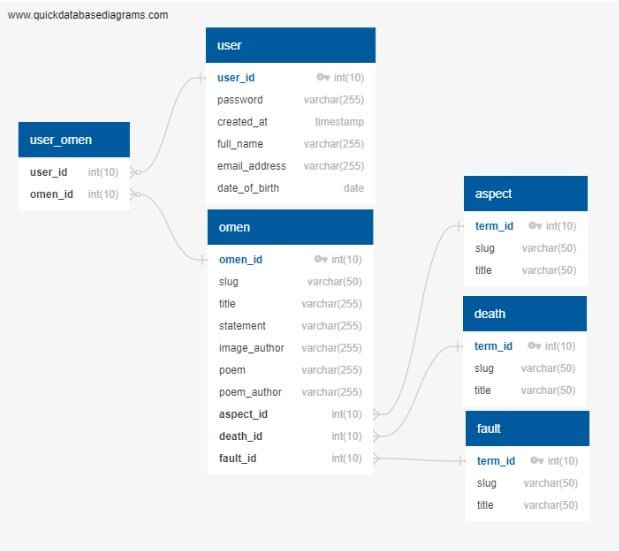
// CODE SNIPPET, NOT THE FULL FILE ///////////////////////////////////////////////////////////////////////////////////////////////////////////////////////////////////////////////////////__________________________________________________________ FLOATING LABEL TEXT INPUTS _________________________________________________________/////////////////////////////////////////////////////////////////////////////////////////////////////////////////////////////////////////////////////For floating labels: User enters text into text input and label floats up.const labelMod = "input__label--selected";const labelModFloating = "input__label--floating"//Each instance contains a label & a text input. The input listens for user inputs and styles the label.//________________________________________________________________ Pair Classvar Pair = function(label, input) { this.label = label; this.input = input; //add floating modifier if (!this.label.classList.contains(labelModFloating)) this.label.classList.add(labelModFloating); if (this.input.value !== "") if (!this.label.classList.contains(labelMod)) this.label.classList.add(labelMod); this.input.addEventListener('input', (event) => { this.label.classList.add(labelMod); //console.log("Focus on: " + this.input.id + ", with label: " + this.label.innerHTML + ", text:" + event.target.value); //Change label style on input if (event.target.value === ""){ if (this.label.classList.contains(labelMod)) this.label.classList.remove(labelMod); } else { if (!this.label.classList.contains(labelMod)) this.label.classList.add(labelMod); } });};//Find all cellsvar cells = [...document.querySelectorAll(".form__cell")];//Create pair classes for each cell that contains exactly one label & one inputfor (let i = 0; i < cells.length; i++) { let cell = cells[i]; let labels = [...cell.querySelectorAll(".input__label")]; let inputs = [...cell.querySelectorAll(".input__text")]; if (labels.length === 1 && inputs.length === 1){ new Pair(labels[0], inputs[0]); }}For this project I was also responsible for setting up our database, as well as all database queries. I designed the database with the following tables: user (to store user information), user_omen (an associative table to store which omens a user encountered), omen (to store information about each omen) and three taxonomy tables: aspect, death and fault (for tagging omens). The only two tables that can be modified through our website are the user and user_omen tables. The omen and taxology tables on the other hand are static.